WhiteBIT is a European exchange with Ukrainian roots. Our scanner sees 326 spot pairs, 395 perpetual contracts and 12 USDT withdrawal networks here. Besides USDT pairs, there are 92 EUR pairs and 16 UAH pairs.
WhiteBIT sign up step by step
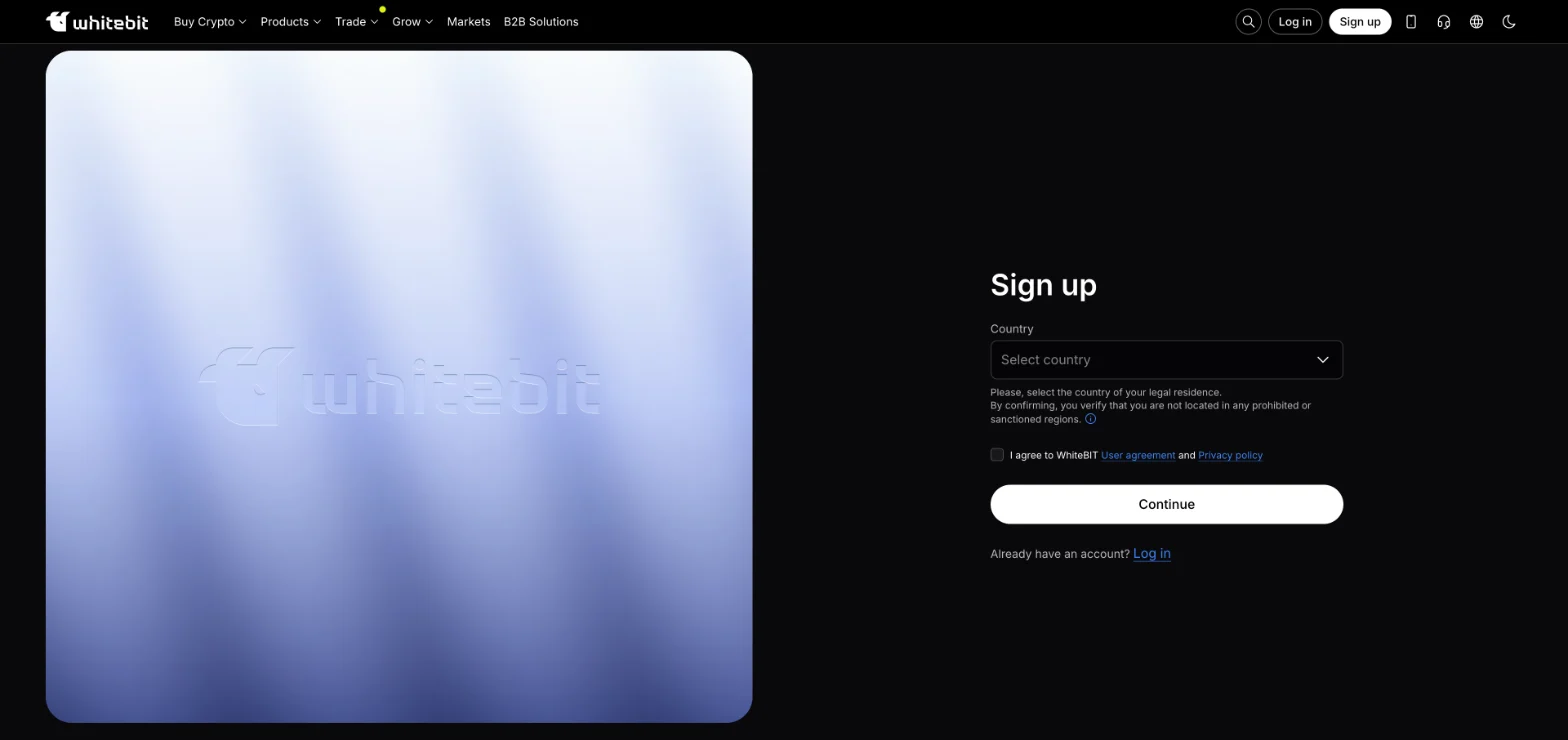
The exchange shows sign-up with the referral code in the address. As the first step WhiteBIT asks you to select your country of legal residence, confirming that you are not in a prohibited or sanctioned region. Then you accept the user agreement and privacy policy and enter your email and password. Later you can also log in with Apple, Google or a QR code.
WhiteBIT KYC verification levels
On WhiteBIT your verification level determines which services are available: the higher the level, the more you can do. According to the exchange, upgrading takes 2–5 minutes — you just upload the documents. Sign-up and verification are open from age 18.
| Level | What you need | What it unlocks |
|---|---|---|
| 0 — initial | Confirm your email | Demo tokens, API, referral programme |
| 1 — basic | Profile data, ID document, selfie, questionnaire | Crypto deposits and withdrawals, spot, margin, futures, Earn |
| 2 — Nova USD Card | Same + phone confirmation | WhiteBIT Nova card |
| 3 — advanced | ID document, selfie, financial questionnaire, proof of address | Fiat deposits and withdrawals, buying crypto |
For EU residents the levels work differently: there is no basic level, and verification includes phone confirmation from the start.
Whose documents WhiteBIT does not accept
According to WhiteBIT's help centre, the exchange does not accept documents from citizens and residents of countries including Russia, Belarus, the United States, Canada, the United Kingdom, Iran, North Korea, Syria, Myanmar, Venezuela, Kosovo, Transnistria and the temporarily occupied territories of Ukraine and Georgia. Documents from citizens and residents of all other countries are accepted.
Deposits and withdrawals on WhiteBIT: which network to choose
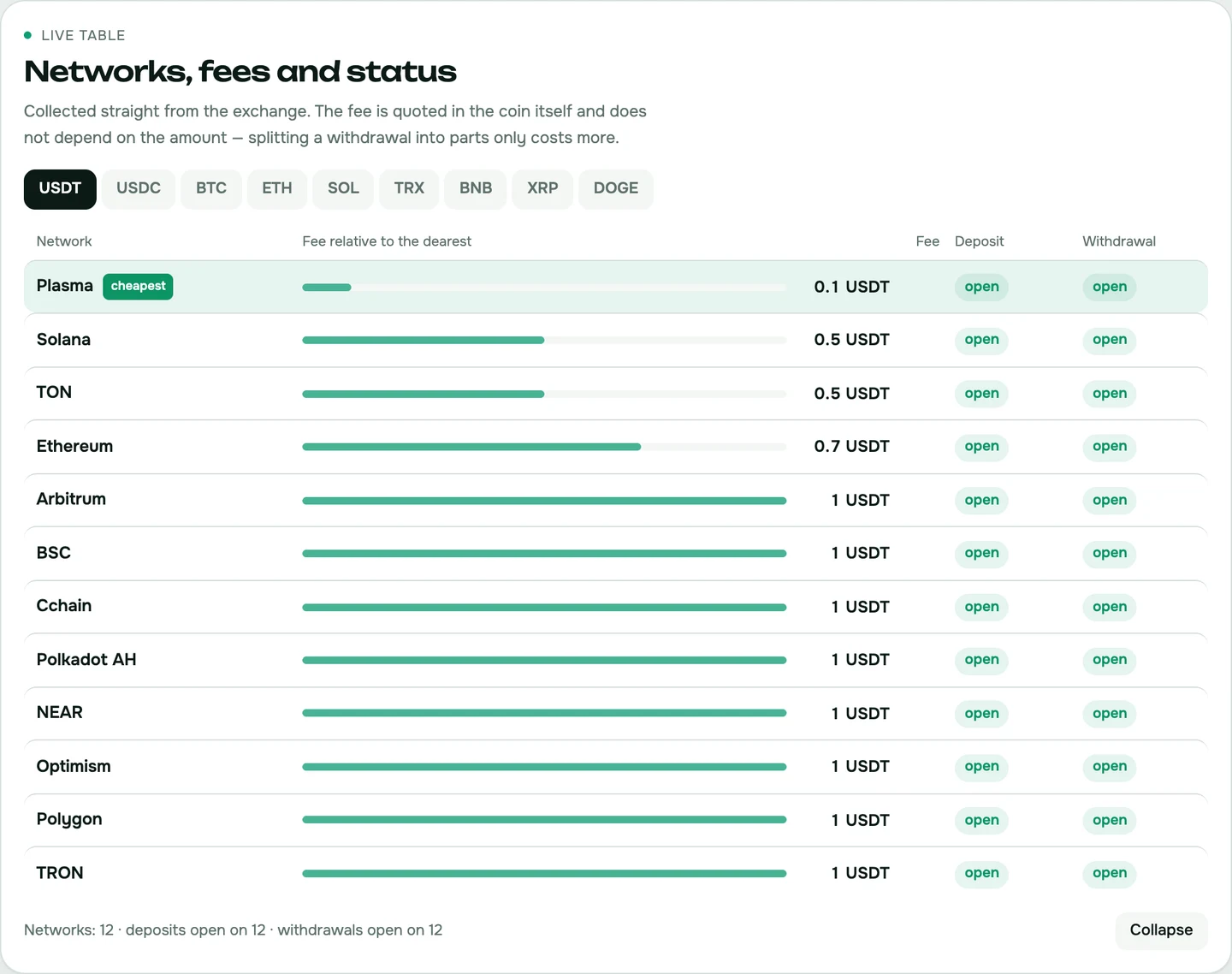
What a USDT withdrawal costs
The withdrawal fee on WhiteBIT depends on the network. As of 16 November 2026, our scanner showed USDT withdrawals for 0.012 USDT via Plasma and 0.04 USDT via CCHAIN and Optimism. The widely used TRC20 costs 1 USDT.
Before transferring, check our WhiteBIT network table — it shows which networks are open right now.
Hryvnia and euro
Fiat deposits and withdrawals open at verification level 3. WhiteBIT's quick top-up is available only to users from Ukraine.
WhiteBIT fees: what trading costs
| Market | Maker | Taker |
|---|---|---|
| Spot | 0.1% | 0.1% |
| Futures | 0.01% | 0.055% |
Fees may differ on some pairs, but on futures the taker fee, according to the exchange, never exceeds 0.055%. The daily rate for borrowed funds in margin and loans is 0.0585%. Details are in our WhiteBIT review.
WhiteBIT sign-up FAQ
Do I need verification on WhiteBIT?
Yes. Without it you only get demo tokens, API and the referral programme. Crypto deposits, withdrawals and trading open at the basic level.
Which documents does WhiteBIT require?
For the basic level: profile data, an ID document, a selfie and a questionnaire. For fiat you also need a financial questionnaire and proof of address.
What does trading on WhiteBIT cost?
0.1% maker and taker on spot, 0.01% and 0.055% on futures.
Can I use hryvnia on WhiteBIT?
Yes, after verification level 3. Quick top-up is available only to users from Ukraine, and the exchange lists UAH pairs.